Every registered Indian business engaged in cross-border trade must complete the mandatory IEC annual update DGFT process between April 1 and June 30 each year. Failure to verify or update your Import Export Code (IEC) on the Directorate General of Foreign Trade (DGFT) portal within this window results in automatic deactivation of your IEC, immediately blocking customs clearance, port access, and export incentive disbursements.
The requirement applies unconditionally to all IEC holders, regardless of whether business operations occurred during the fiscal year or whether your company information remains entirely unchanged. If your firm has zero modifications to report, you must still log in and electronically confirm that your existing profile details are accurate.
Navigating this regulatory checkpoint requires clear awareness of portal navigation, authentication workflows, and system dependencies with ICEGATE and the Public Financial Management System (PFMS). This comprehensive guide walks you through the regulatory framework, precise portal steps, error troubleshooting, and reactivation procedures to keep your global supply chain moving uninterrupted.
The Regulatory Mandate: Foreign Trade Policy & DGFT Notifications
Under Chapter 1 and Chapter 2 of the Foreign Trade Policy (FTP), read alongside DGFT Notification No. 58/2015-2020 and subsequent trade notices, the Directorate General of Foreign Trade amended Para 2.05 of the FTP Handbook of Procedures. This amendment transformed the Import Export Code from a static, one-time lifetime registration into an annually verified digital identity.
Historically, an IEC was issued once and remained active indefinitely unless explicitly surrendered or cancelled via show-cause proceedings. This legacy approach created millions of dormant, duplicate, and unmonitored IEC records across India. Many belonged to closed entities, dissolved partnerships, or non-compliant traders. To combat trade-based money laundering, customs fraud, and systemic data inaccuracies, the DGFT operationalised an annual electronic audit.
The Mandatory April–June Annual Window
The annual cycle opens on April 1 and closes on June 30 of every financial year. During this 91-day window, every IEC holder must access the DGFT online system to confirm or modify their business details.
Even if an entity received its initial IEC issuance between January and March of the current calendar year, standard regulatory protocol requires logging in during the subsequent April–June window to validate the master profile. Missing this timeline triggers systemic non-compliance flags.
Why DGFT Enforces the Yearly Confirmation
The annual update is not merely an administrative formality. It serves critical functions within India's customs and tax ecosystem:
- ICEGATE Synchronisation: Live validation between DGFT and the Indian Customs Electronic Data Interchange Gateway (ICEGATE) prevents goods from clearing customs under invalid business profiles.
- KYC and Anti-Fraud Compliance: It verifies that directors, partners, and proprietors possess active PANs and updated permanent address proofs linked with bank accounts.
- PFMS and Export Remittance Alignment: It validates bank details against PFMS to ensure export promotion scheme refunds—such as RoDTEP, RoSCTL, and Duty Drawback—reach legitimate corporate accounts.
- Purging Shell Entities: Inactive or fraudulent entities that fail to complete confirmation are systematically decommissioned from the national trade ledger.
Who Must Complete the IEC Annual Update in 2026?
A frequent misconception among new exporters is that the update is only required when changes occur—such as adding a branch or changing a bank account. In reality, the mandate applies to every active IEC holder without exception.
[All Registered IECs]
       │
       ├─► Active Traders (Imports/Exports during the year) ──► MUST CONFIRM / UPDATE
       ├─► Inactive Traders (Zero shipments during the year) ─► MUST CONFIRM / UPDATE
       ├─► Special Categories (EOUs, SEZ units, Trusts) ──────► MUST CONFIRM / UPDATE
       └─► Newly Issued IECs (Issued before April 1) ─────────► MUST CONFIRM / UPDATE
The mandate covers all business structures:
- Sole Proprietorships: Requires verification of proprietor PAN, residential address, and linked current account.
- Partnership Firms and LLPs: Requires validation of active partners, contribution ratios, and Designated Partner Identification Numbers (DPIN).
- Private and Public Limited Companies: Requires confirmation of the Director Identification Number (DIN), corporate identity number (CIN), registered office address, and authorized signatories.
- Special Economic Zone (SEZ) and EOU Units: Special entities holding independent IEC registrations must validate zone-specific operational addresses alongside standard corporate information.
- Trusts, Societies, and HUFs: Charitable or non-profit entities exporting scientific, educational, or cultural goods under specialized permissions.
If you held an active IEC on or before March 31, 2026, you are legally obligated to perform the IEC annual update DGFT confirmation by June 30, 2026, regardless of trade volume.
Annual Confirmation vs. IEC Modification: Critical Differences
Many exporters confuse the mandatory annual confirmation with a formal IEC modification. While both processes take place within the same module on the DGFT portal, their operational triggers, costs, and documentation requirements differ.
- Annual Confirmation: You review your existing details, discover no changes are necessary, and digitally sign off on the data. The system updates your "Last Updated Date" to the current year.
- IEC Modification/Amendment: You alter key business information—such as adding an export warehouse, updating bank account numbers, or adding a new director. This requires uploading supporting legal documents and paying a statutory government fee.
| Parameter | Annual IEC Confirmation (No Changes) | IEC Modification / Amendment (Changes Made) |
|---|---|---|
| Trigger | Mandatory annual compliance (April–June) | Need-based changes to business details |
| Government Fee | Nil (Free of cost) | ₹200 (Standard DGFT amendment fee) |
| Document Uploads | None (Pre-existing data confirmed) | Proof of change (e.g., Bank Certificate, Lease, Board Resolution) |
| Approval Workflow | Instant auto-approval upon digital signature | Auto-approved or officer review depending on field modified |
| System Validation | Immediate date-stamp update on DGFT profile | Systemic re-validation with PAN, MCA, and PFMS databases |
| Authentication Mode | Aadhaar OTP or Class 3 DSC | Aadhaar OTP or Class 3 DSC |
| Effect on ICEGATE | Keeps existing ICEGATE transmission active | Pushes updated XML schema to ICEGATE within 24–48 hours |
If you initiate an amendment during the April–June window, completing and signing that modification successfully satisfies your annual confirmation requirement for that financial year.
Prerequisites and Pre-Update Checklist
Before accessing the DGFT portal, assemble all necessary access credentials and corporate documentation to avoid session timeouts and validation errors.
1. DGFT Portal User Profile
Ensure you have an active user account on the unified DGFT portal (dgft.gov.in) linked directly to your firm's IEC. If you have not linked your IEC to your user profile using a Digital Signature Certificate (DSC) or Aadhaar OTP, you cannot access profile management.
2. Digital Signature Certificate (DSC) or Aadhaar Details
- For Companies and LLPs: A Class 3 DSC issued in the name of the authorized director or designated partner whose PAN is registered with the IEC profile. The e-Mudhra or DGFT PKI component must be installed on your operating system.
- For Proprietorships: The proprietor's Aadhaar-linked mobile number must be active to receive one-time passwords (OTP), or a Class 3 individual DSC can be used.
3. Banking Documentation
Verify that your primary export-import current account remains active. If modifying your banking details, prepare:
- A pre-printed cancelled cheque displaying the firm's name and account number.
- A bank certificate in the prescribed DGFT format (Form ANF-2A) signed by the branch manager.
4. Address Verification Proofs
If updating business premises or branch locations, prepare clean PDF scans (under 5 MB) of:
- Registered lease or rent agreement alongside a recent utility bill (electricity, water, or landline bill not older than two months).
- Valid municipal trade license or property ownership deed.
- GST Registration Certificate (Principal Place of Business).
Pre-Submission Validation Checklist:
[ ] DGFT User ID & Password functional
[ ] Class 3 DSC driver updated / Aadhaar phone active
[ ] Active PAN seeded with Aadhaar for all directors/partners
[ ] PFMS validation status showing "Validated" on current bank account
[ ] All branch addresses matching GSTIN portal records exactly
Step-by-Step Guide: Completing the IEC Annual Update on the DGFT Portal
Follow this detailed operational sequence to complete your mandatory filing smoothly on the official DGFT website.
Step 1: Portal Access and Authentication
Open an updated web browser (Google Chrome or Mozilla Firefox) and navigate directly to https://www.dgft.gov.in. Click on the Login button at the top right of the homepage. Enter your registered username, password, and the dynamic CAPTCHA security string.
Step 2: Accessing Profile Management
Once inside the dashboard, locate the top navigation bar. Click on Services and select IEC Profile Management from the drop-down menu. From the secondary menu, click on Update/Modify IEC.
[DGFT Homepage] ──► [Login] ──► [Services] ──► [IEC Profile Management] ──► [Update/Modify IEC]Step 3: Verifying Basic Entity Details
The system will present your electronic IEC Master Record across several structured tabs:
- Basic Details: Shows entity category (Proprietorship, Private Limited, etc.), legal name, PAN, and date of incorporation. Check every field for alignment with the Ministry of Corporate Affairs (MCA) or PAN master registry.
- Firm Details: Displays registered office address, phone number, and official email. Ensure your business email is accessible; critical compliance alerts are sent here.
Step 4: Reviewing Branch Information
Navigate to the Branch Details tab. Confirm that every operating manufacturing plant, domestic branch, or export warehouse is accurately registered. If your firm has opened or closed an operational site, adjust the records accordingly. If no changes exist, leave the records untouched.
Step 5: Validating Directors, Partners, or Karta
Open the Directors / Partners / Karta tab. The DGFT platform cross-references director records with the MCA database in real time.
- Confirm that all listed DINs, PANs, and personal residential addresses are current.
- Ensure that any resigned director has been removed and newly inducted board members have been added with their respective appointment dates.
Step 6: Bank Account Verification
Select the Bank Information tab. Verify that the IFSC code, account number, branch name, and primary operational status are correct. The DGFT portal integrates directly with the PFMS.
- Check the validation indicator. A green "Validated" tag indicates successful integration with the customs interface.
- If your bank underwent a merger or the IFSC code changed, edit this tab and provide a cancelled cheque to trigger PFMS re-validation.
Step 7: Application Submission (Scenario A vs Scenario B)
At the conclusion of the review tabs, you will reach the Declaration / Application Submission stage.
- Scenario A: Zero Changes (Pure Confirmation)
If no modifications were made, click on the Confirm and Proceed button. Check the legal declaration box certifying that all master details remain accurate, authentic, and unchanged. The system will skip the payment gateway entirely, as standard annual confirmations carry zero government processing fee.
- Scenario B: Profile Modifications Executed
If you edited addresses, directors, or banking details, you must click Save & Next, upload the designated documentary evidence in the attachments window, and accept the declaration. You will be redirected to the Bharatkosh / Non-Tax Receipt Portal (NTRP) payment gateway to remit the standard ₹200 modification fee.
Step 8: Digital Signing and Submission
Select your digital authentication method:
- Sign via DSC: Insert your USB token, choose your Class 3 cryptographic certificate from the pop-up prompt, input your token PIN, and authenticate. Ensure the DGFT digital signature utility is running in your system tray.
- Sign via Aadhaar e-Sign: Enter the authorized signatory's 12-digit Aadhaar number, accept the UIDAI consent clause, and enter the 6-digit OTP sent to the registered mobile number.
[Submit Application]
         │
         ├─► Class 3 DSC ──► Select Certificate ──► Enter Token PIN ──► Success
         │
         └─► Aadhaar OTP ──► Request UIDAI OTP ──► Enter 6-digit OTP ──► Success
Step 9: Verifying Confirmation Success
Upon successful signature, the system generates an electronic acknowledgement receipt. To verify that your confirmation registered successfully:
- Return to the IEC Profile Management dashboard.
- Check the field labelled IEC Last Updated Date.
- Confirm that the date displays the current calendar day in 2026.
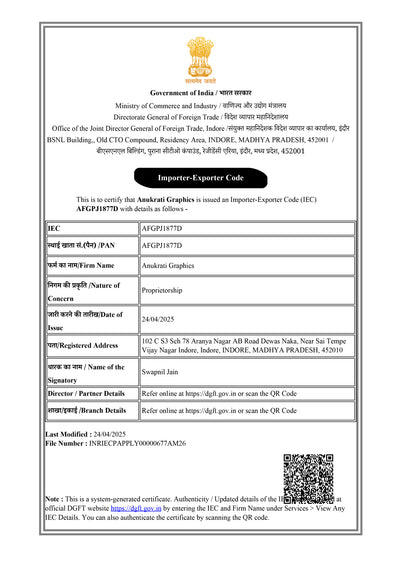
- Download the newly stamped IEC e-Certificate, which will display the latest revision date in the document footer.
What Happens If You Miss the June 30 Deadline?
Ignoring the June 30 regulatory deadline sets off automated administrative sanctions across multiple trade platforms. The DGFT system operates on an automated schedule that flags unconfirmed IECs as non-compliant shortly after the window closes.
Immediate Deactivation and Port Blocking
Once the portal runs its deactivation routine, your IEC status transitions from "Active" to "Suspended" or "Deactivated". This status change synchronises automatically with ICEGATE, creating immediate operational bottlenecks:
- Customs Rejections: Customs brokers cannot file a Bill of Entry for incoming shipments or generate a Shipping Bill for outbound export containers. Cargo will be stopped at inland container depots (ICDs) and sea ports.
- Demurrage and Detention Accrual: Goods stranded at ports accumulate substantial shipping line detention and port demurrage charges, often reaching thousands of dollars per day for large container volumes.
- Export Incentive Disruption: The processing of RoDTEP, RoSCTL, duty drawback, and GST refund claims is halted. The automated customs systems freeze refund scrolls linked to suspended IEC numbers.
- Advance Authorisation / EPCG Complications: Existing license holders cannot clear imports duty-free under Advance Authorisations or Export Promotion Capital Goods (EPCG) licenses.
Step-by-Step Reactivation of a Deactivated IEC
If you miss the deadline and your IEC is deactivated, follow this operational recovery path to restore active status:
- Access the DGFT Portal: Log into
dgft.gov.inusing your standard corporate administrative credentials. - Navigate to IEC Management: Go to Services -> IEC Profile Management -> Update/Modify IEC.
- Complete the Delayed Updation: Review your master data, make any required edits, or confirm the details as they stand.
- Pay Statutory Penalties/Fees: While regular annual confirmation before June 30 is free, reactivating a deactivated IEC may attract a late fee or standard processing charge, as outlined in prevailing DGFT trade notices.
- Digitally Sign and Submit: Complete electronic authentication using your Class 3 DSC or Aadhaar OTP.
- Automatic Status Transition: The DGFT portal will validate the submission and automatically transition your code back to "Active".
- Monitor ICEGATE Transmission: Note that customs synchronization is not instantaneous. The updated IEC status typically takes between 12 and 48 hours to transmit through the ICEGATE pipeline. Plan logistics movements accordingly.
Common Pitfalls and Technical Errors (And How to Fix Them)
Many exporters face technical hurdles while completing the IEC annual update DGFT process. Preparing for these edge cases helps prevent last-minute compliance failures.
1. The "IEC Not Linked to Profile" Error
- The Problem: You log in, but the system informs you that no IEC is associated with your account.
- The Fix: Go to your user profile settings and click Link IEC. Enter your firm's IEC number and authenticate using the PAN holder's Class 3 DSC or Aadhaar OTP. Once linked, the IEC management modules unlock instantly.
2. Digital Signature (DSC) Utility Failures
- The Problem: The portal displays errors such as "PKI Client Service Not Running" or fails to recognize the connected USB token.
- The Fix: Download and install the latest DGFT PKI Service Component directly from the portal's download section. Run the application as an administrator, clear your browser cache, ensure your Java Runtime Environment (JRE) is updated, and access the portal via a private or incognito window.
3. PFMS Banking Rejection Status
- The Problem: The Bank Account tab reflects a "Rejected by PFMS" or "Pending with PFMS" status.
- The Fix: This occurs when the exact legal business name on the PAN card does not match the name held on record by your bank. Contact your bank's foreign exchange or corporate branch to harmonize your entity name down to the exact punctuation. Once adjusted, upload an updated cancelled cheque and bank certificate on the DGFT portal.
4. PAN-Aadhaar Non-Seeding Directorial Blocks
- The Problem: The submission fails during director detail validation due to income tax data mismatches.
- The Fix: Indian tax laws require all PAN numbers to be linked to the individual's Aadhaar card. Ensure every listed partner, director, or proprietor has confirmed active PAN-Aadhaar linking via the Income Tax e-filing portal before initiating the annual IEC review.
5. Severe Server Latency in Late June
- The Problem: System crashes, gateway timeouts, and frozen pages caused by hundreds of thousands of exporters rushing to file right before the June 30 cut-off.
- The Fix: File your confirmation in April or May. Completing the update early eliminates the risk of missing the deadline due to systemic portal overloads.
Internal Compliance Protocol for Export-Import Businesses
To ensure your cross-border trade operations never face sudden disruptions, incorporate the following standard operating procedures (SOPs) into your organization's legal and trade compliance calendar:
Annual Compliance Calendar:
April 01-15  ──► Review master corporate data across MCA, GST, and Banking portals
April 16-30  ──► Complete DGFT IEC Annual Confirmation via DSC/e-Sign
May 01-05    ──► Verify Last Updated Date & confirm ICEGATE transmission status
Ongoing ──► Run biannual checks on export incentives, bank AD codes, and EPCG licenses- Assign Explicit Compliance Ownership: Designate a specific officer—such as your logistics director, company secretary, or supply chain manager—with explicit responsibility for monitoring the DGFT portal each April.
- Maintain Master Compliance Folders: Keep a secure internal repository containing the current Class 3 DSC token, active bank certificates, utility bills, and GST certificates. This ensures any required amendments can be handled immediately.
- Synchronise Secondary Registrations: Whenever you complete an IEC update, verify that related registrations remain aligned—including Authorised Dealer (AD) Codes registered at customs ports, Registration Cum Membership Certificates (RCMC) with Export Promotion Councils, and Authorized Economic Operator (AEO) certifications.
Frequently Asked Questions
What is the exact deadline to complete the IEC annual update on DGFT?
The annual window opens on April 1 and closes on June 30 of every financial year. You must complete your digital confirmation or modification within these 91 days to avoid automatic system deactivation.
Is there a government fee for updating the IEC if I have no changes to report?
No. If your IEC details remain completely unchanged, the annual confirmation process is entirely free. A statutory ₹200 government fee applies only if you modify existing corporate details, such as addresses, directors, or bank accounts.
What happens if I fail to complete the IEC annual update before June 30?
Your IEC will be flagged as non-compliant and deactivated by the DGFT portal. Once deactivated, you cannot file Bills of Entry or Shipping Bills on ICEGATE, leaving your international shipments stranded at customs until the IEC is reactivated.
I obtained my new IEC in February 2026. Do I still need to update it by June 2026?
Yes. Under current DGFT regulations, any entity holding an active IEC issued on or before March 31 must confirm their details during the subsequent April–June window, regardless of how recently the code was issued.
Can I complete the annual confirmation using Aadhaar OTP instead of a DSC?
Yes. Proprietorships can authenticate their annual confirmation using an Aadhaar OTP sent to the proprietor's registered mobile number. Private limited companies, LLPs, and public corporations typically require a Class 3 Digital Signature Certificate of an authorized signatory.
How long does it take for a reactivated IEC to reflect on ICEGATE for customs clearance?
Once you submit your delayed update and clear any pending requirements on the DGFT portal, reactivation on the DGFT database is virtually instantaneous. However, automated transmission to ICEGATE typically takes between 12 and 48 hours to fully synchronize.
Can my customs broker or freight forwarder complete the IEC update on my behalf?
A customs broker or external consultant can prepare and navigate the update on your behalf, but final submission requires authorization via the entity's proprietary Class 3 DSC or an Aadhaar OTP sent to the registered primary officer.
Will updating my IEC affect my existing Advance Authorisation or EPCG licenses?
No. Routine annual confirmation does not disrupt existing foreign trade licenses. In fact, keeping your IEC updated ensures you can continue to log import-export transactions, redeem licenses, and claim benefits without operational stops.
Protecting Your Global Trade Velocity
India's digital trade ecosystem leaves no room for lapsed regulatory compliance. The mandatory annual IEC confirmation on the DGFT portal is a quick administrative process that safeguards your entire supply chain against costly delays, port storage fees, and customs holds.
Take action early in the April–June cycle. Review your master records, verify bank and branch integrations, apply your digital signature, and secure an updated IEC certificate. Staying compliant ensures your trade operations remain fully operational throughout the year.
Are you looking to expand your international buyer network or discover reliable suppliers across global markets? Join Today Adviser to connect with verified exporters, secure trusted trading partners, and stay up to date with the latest global trade regulations.