A practical guide to exporting leads from Facebook Ads, Salesforce, Zoho, HubSpot and Apollo — merging, deduping, compliance and follow-up.
Exporters collect leads in several places: a Facebook lead form, a Salesforce pipeline, a HubSpot contact list, an Apollo search. Each tool holds part of the picture, and none of them, on its own, tells you who to contact next. This guide explains how to export leads from Facebook Ads, Salesforce and your CRM into one workable list, how to merge and clean it, and how to work it until it produces export orders.
Why one exportable lead list matters
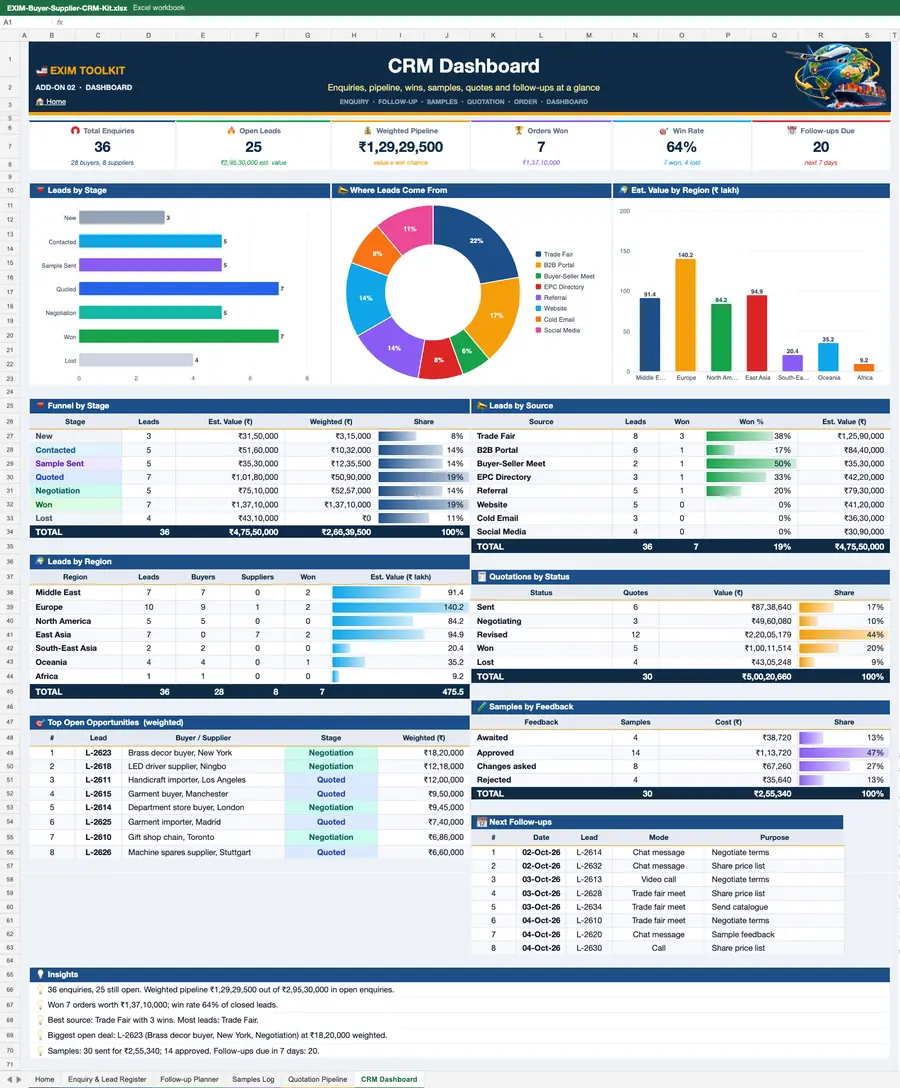
A single lead list matters because follow-up is where export orders are won. If your Facebook leads sit in Ads Manager, your Salesforce leads sit in a report nobody opens, and your HubSpot contacts sit in a separate list, the same buyer can be contacted twice, or not at all. A merged list in Excel or in your CRM gives every lead one owner, one status and one next step.
A single list also makes prioritisation possible. You can sort by product interest, by country, by order size and by how the lead arrived — a buyer who filled in a form asking for a quote is warmer than a name scraped from a directory. And it makes reporting honest: you can see how many leads came from each source, how many replied, how many asked for a sample and how many became orders. Without that, marketing spend is guesswork.
Facebook Ads Manager: lead export
Facebook lead ads collect enquiries through a lead form attached to your advert. When someone submits the form, their details go to Meta's lead system. To export them, open Ads Manager, go to the campaign that used the lead form, and open the leads section. From there you can download the leads as a CSV file, which opens in Excel. The file usually includes the name, email, phone number and any custom questions you asked on the form, plus the date and the campaign name.
For ongoing campaigns, downloading a CSV every day is tedious, so many exporters automate the flow. Meta offers a leads sync that can send new leads to a CRM such as HubSpot, Salesforce or Zoho as soon as they arrive, often through the CRM's own Facebook integration or through a connector. Set the sync up once, test it with a form submission, and check that the fields map correctly — especially phone numbers and custom answers. Remember that these leads gave you their details for a specific purpose, so contact them promptly, explain why you are writing, and do not add them to unrelated marketing lists without consent.
Salesforce: reports, list views and Data Loader
Salesforce holds your leads in a structured way, and it offers several export routes. The simplest is a list view: open the Leads tab, choose or create a list view with the columns you need — name, company, country, status, source, product interest — and use the export option to download the view as a CSV file. For a larger or more complex export, build a report: choose the Leads report type, add the fields and filters you need, run it, and export the results to Excel.
For bulk work, Salesforce Data Loader is the standard tool. It lets you export large numbers of records, including related data, and it can also update records in bulk. Data Loader needs to be installed and connected with the right permissions, so ask your Salesforce administrator if you do not have access. Whichever route you use, export only the fields you need, and keep a note of the filters you applied, so the same export can be repeated next month.
Other CRMs: Zoho, HubSpot and Apollo
The pattern is similar in other CRMs. In Zoho CRM, open the Leads module, choose a list view, and use the export option to download the records as a CSV or Excel file; you can also export from a report. In HubSpot, open Contacts, filter the list to the leads you want, and use the export action to download a CSV; HubSpot also lets you export lists and workflows, which is useful if you segment by product or country. In Apollo, build a list of contacts or companies, then use the export option to download it as a CSV, checking the plan limits on how many records you can export at once.
In every case, check what the export includes before you rely on it. Some tools export only the fields shown in the list view, so add the columns you need first. Some limit exports by plan, so a large list may need to be exported in batches. And some enrich the data with information from their own databases — useful, but verify it before you use it in outreach.
Merging sources, deduping and staying compliant
Merging is where most lead lists go wrong. Start by standardising the columns: name, company, email, phone, country, product interest, source, date and status, with the same format in every file. Then combine the files into one sheet and remove duplicates. The email address is usually the best key for dedupe, because the same person may appear with a different job title in each system; where there is no email, use the company name plus the person's name.
Compliance matters as much as accuracy. Only contact people who gave you their details for a business enquiry, or where you have a legitimate business reason and a clear way to opt out. Respect data rules in the buyer's country — for example, the GDPR in the EU and similar rules elsewhere — and keep a record of where each lead came from and what consent was given. Delete leads you no longer need, and do not buy lists of personal data from unknown sources. A compliant list is smaller, but it is one you can use with confidence.
Working the list: prioritisation and follow-up
A merged list is only useful if you work it. Prioritise first: buyers who asked for a quote, who match your product and market, and who replied before. Then set a follow-up cadence: a first message within a day or two of the enquiry, a second message after a week if there is no reply, and a third after another week. Each message should add something — a spec sheet, a sample offer, a price indication — rather than repeating "just checking in".
Track every step in the sheet or CRM: the date of each message, the reply, the sample request and the quote. Review the list weekly, move warm leads to the top, and retire leads that have not replied after three useful contacts to a later date rather than deleting them. Buying cycles change, and a buyer who is not interested today may be sourcing in three months. And keep feeding the list with new sources, so it grows with buyers who are actively looking.
If you want buyers who are already looking, browse the TodayAdviser buyer directory to search importers by product and country, and post a requirement (RFQ) on TodayAdviser so verified buyers can respond directly to your offer. A directory search plus a live requirement reaches buyers who are actively sourcing, which is a better use of time than cold outreach alone.
Frequently asked questions
How do I export leads from Facebook Ads Manager?
Open Ads Manager, go to the campaign with the lead form, open the leads section and download the leads as a CSV file. For ongoing campaigns, set up a CRM sync so new leads flow into your CRM automatically.
How do I export leads from Salesforce to Excel?
Use a Leads list view or a Leads report and export it as a CSV, or use Salesforce Data Loader for large exports. Export only the fields you need and note the filters, so the export can be repeated.
Can I export leads from Zoho, HubSpot and Apollo?
Yes. In each, filter the contacts or leads you want and use the export action to download a CSV. Check plan limits on the number of records, and add the columns you need to the list view before exporting.
How do I merge leads from several sources without duplicates?
Standardise the columns, combine the files, and dedupe on the email address, or on company plus name where there is no email. Keep the source and date for every lead so you know where it came from.
How do I keep a lead list compliant?
Contact only people who enquired or where you have a legitimate business reason, explain why you are writing, offer a clear opt-out, and respect the data rules of the buyer's country. Keep a record of the source and consent for each lead.
Where can I find buyers who are already looking?
Search the TodayAdviser buyer directory by product and country, and post a requirement (RFQ) on TodayAdviser so verified buyers can respond directly to your offer.